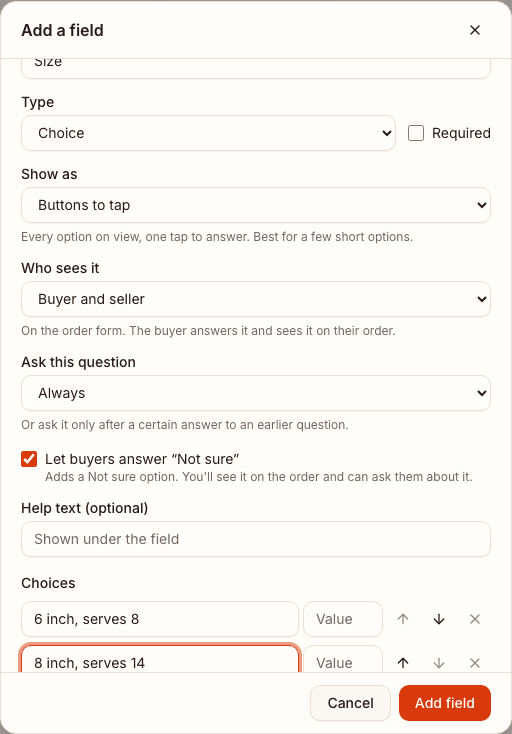
Under Your fields in your settings, Add a field opens a question of your own. Customers answer it on your order form, and the answers show on the order and in the emails about it.
Kinds of answer
- Short text and Long text: names, inscriptions, descriptions.
- Number and Quantity: a number, or how many. One quantity question can be the number of items ordered: prices on the order then become per item, and the total is the price times that number.
- Choice: one answer from a list. Up to six choices show as buttons and more as a dropdown, unless you pick one yourself under Show as.
- Multiple choice: any number of answers.
- Yes / no.
- Date and Time.
- Body measurement: see Asking for body measurements.
Settings on each question
- Label: the question itself.
- Required: the form can't be sent without an answer.
- Who sees it: Buyer and seller for a question customers answer, or Only you (seller) for a field that isn't on the form. You fill it in on each order and your customer never sees it. "Baking tray" or "Paid deposit" are examples.
- Ask this question: always, or only after an earlier answer. It shows once your form has a choice or yes/no question to depend on. See Ask a question only when.
- Let buyers answer “Not sure”: for questions customers may not know the answer to. You see "Not sure" on the order and can ask them about it.
- Help text and Placeholder: a line under the question, and an example inside the empty box.
- Choices: for a choice question. Each choice can carry a Value, the number it counts as in a calculated value, such as its price.
- Smallest and Largest for numbers, and Longest answer for text.
The list
Your questions sit under the standard ones. Drag one to reorder it, or use its arrows; the pencil edits it and the bin removes it. Orders that already answered a removed question keep their answer.
Add a measurement set adds a tailor's usual measurements in one go: Shirt, Trousers, Dress or Jacket.
To show an answer on invoices and receipts, tick it under Documents in your settings.
New and changed questions are part of your draft: they reach your page when you press Save. How many questions you can add depends on your plan.