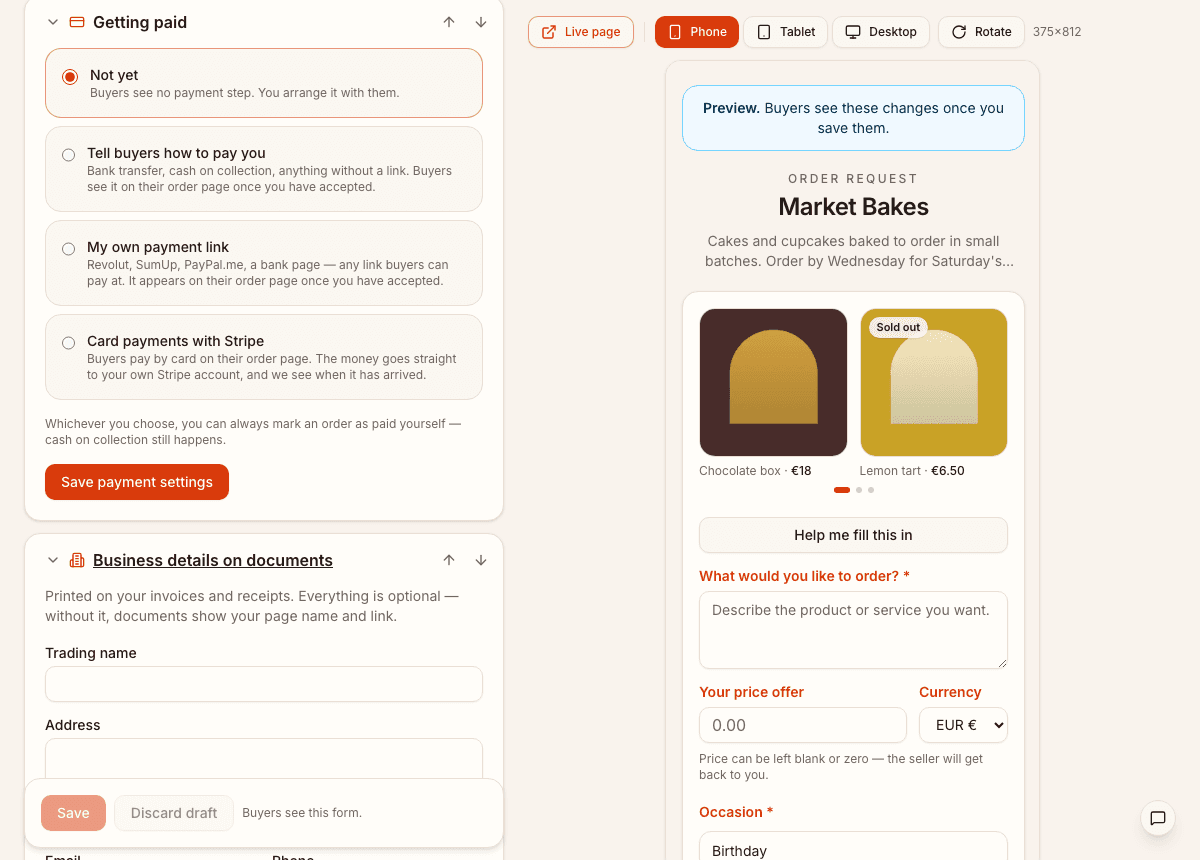
Getting paid in your settings is how customers pay you. Whatever you choose, the money goes straight to you: Rapid Cart never holds it.
The ways
- Not yet: buyers see no payment step. You arrange it with them.
- Tell buyers how to pay you: a bank transfer, cash on collection, anything without a link. Your words show on their order page, with the amount and reference above them to copy.
- My own payment link: a Revolut, SumUp or PayPal.me link, or your bank's payment page. Customers get a button that opens it, with the amount and reference filled in where your service allows, and both ready to copy where it doesn't.
- Card payments with Stripe: customers pay by card on a secure Stripe page, into your own Stripe account. See Card payments with Stripe.
When customers can pay
Only once the order is agreed: accepted, and with any terms or changes confirmed. Until then, their order page shows no payment step.
"I've sent the payment"
Under your written instructions, customers can press I've sent the payment after paying. Your dashboard and the order then show that they say they've sent it, and you check your account before marking it paid. See Marking an order paid.
Press Save payment settings after choosing. The section is there on plans that include payments, and card payments with Stripe on the plans named in it.
Whichever way you choose, Mark as paid on an order is always there, for cash, transfers or anything else.