Your dashboard is where orders land. Incoming orders lists every order, newest first.
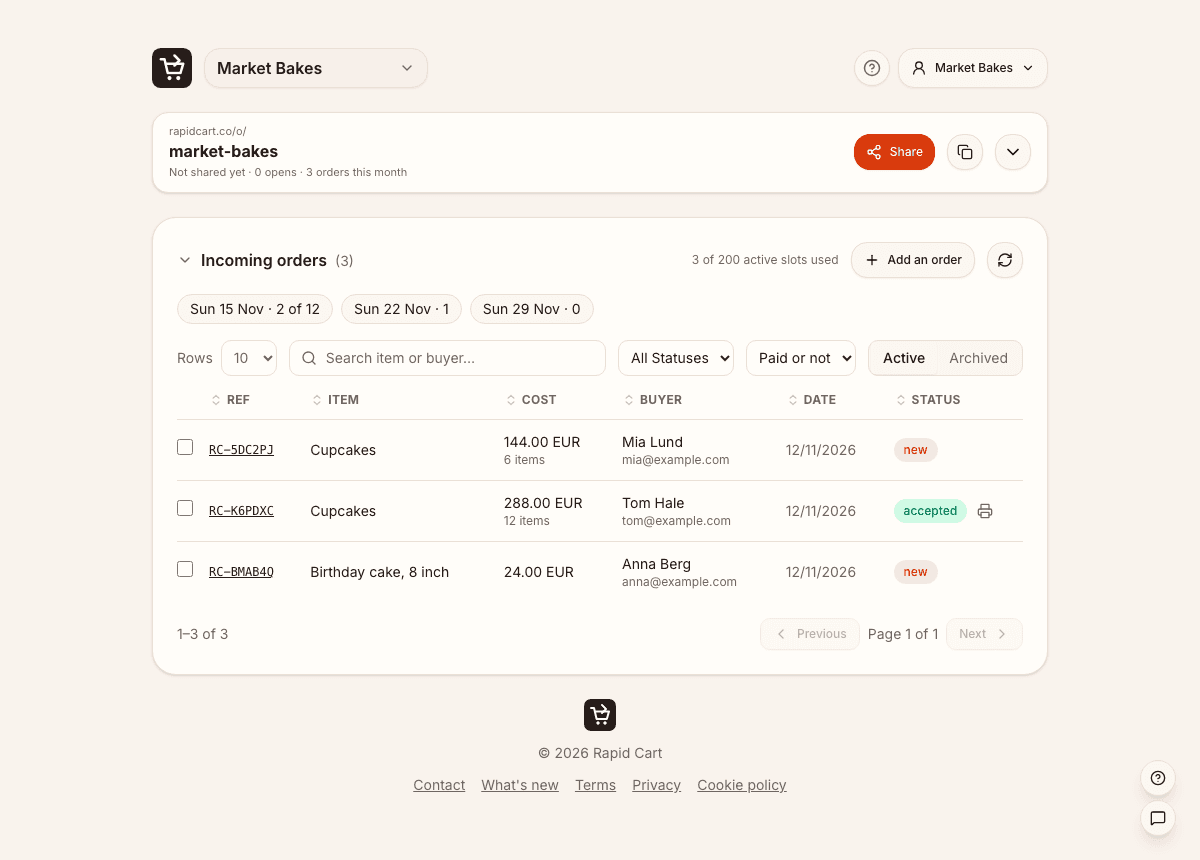
Reading the list
Each order shows its reference (such as RC-7KQ2), what was ordered, its cost, the customer, the date and its status. Orders with a message from the customer you haven't answered are marked The customer wrote after you did.
- Search by item or buyer, and sort by any column.
- Filter by status, and by paid or not.
- Check for new orders refreshes the list without reloading the page.
The bar above the list shows in how many places you've shared your link, how many people opened it this month and how many orders came, with Share beside it. Its arrow opens all the sharing options. See Sharing your order link.
Add an order writes down an order you agreed somewhere else. See Adding an order yourself.
Days
If your page takes orders for set days, those days show as chips above the list, each with its count. Pick one to see only that day; Print this day opens its sheet. See Orders by day and the day's sheet.
Archived orders
Archive orders you've finished with to keep the list short: tick them and archive. Archived beside Active shows them again. Archiving changes nothing for the customer: their order page stays as it was. Looking back through archived orders depends on your plan.
When your page pauses
Your plan sets how many orders can be active at once, and the list shows how many of those slots are used. When they're all taken, your order page pauses until you mark some orders ready or decline them. Orders you already have carry on as normal.
More than one page
If you have several order pages, the dashboard shows one at a time; switch between them at the top. See More than one order page.