Orders change: "make it chocolate", "deliver to my office instead". Write the change on the order, and your customer confirms it.
Changing the details
Under Request on the order, Edit details opens what was ordered, your customer's answers, special wishes, the delivery address and the time. Change what's needed and press Send to confirm.
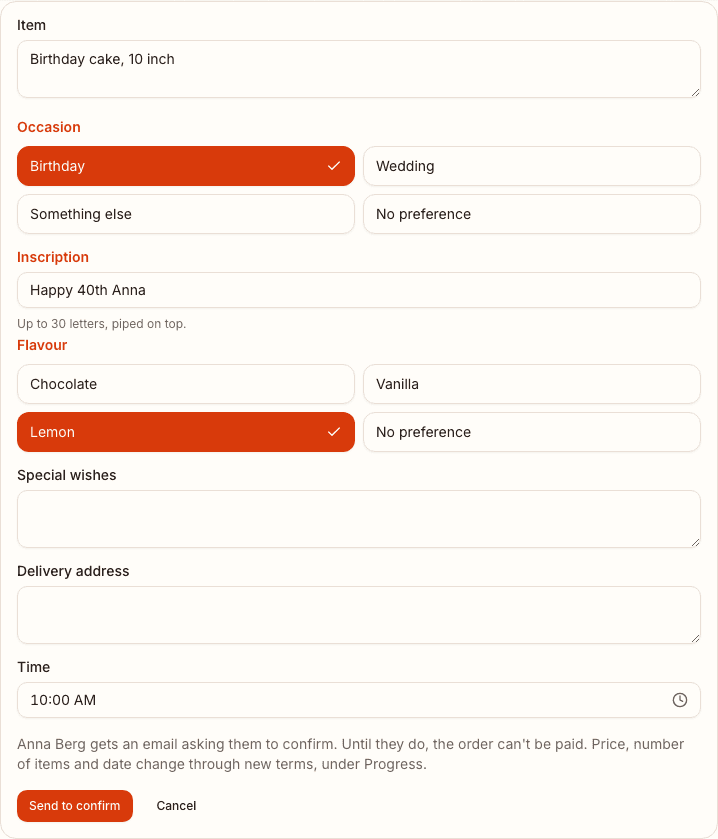
Your customer gets an email, and their order page lists each change, the old value struck through. One tap on Confirm the changes settles it. Until then:
- the order says "Waiting for … to confirm your changes";
- nothing can be paid, and no invoice can be sent.
Price, number of items and date
These are terms, and change with Propose new terms under Progress. See Prices, quantities and dates. If new terms and changed details are waiting together, one tap confirms both.
History
Every change is kept. History under Request shows each one: when, what it was before and after, and whether it was confirmed. Your customer sees the same history on their order page.
A paid, finished or declined order can't be changed. Write to your customer instead.