When your page takes orders for set days, your dashboard shows those days as chips above the orders. Pick one to see only that day's orders.
The day's sheet
Print this day opens a sheet for the picked day, ready to print or keep open on a tablet:
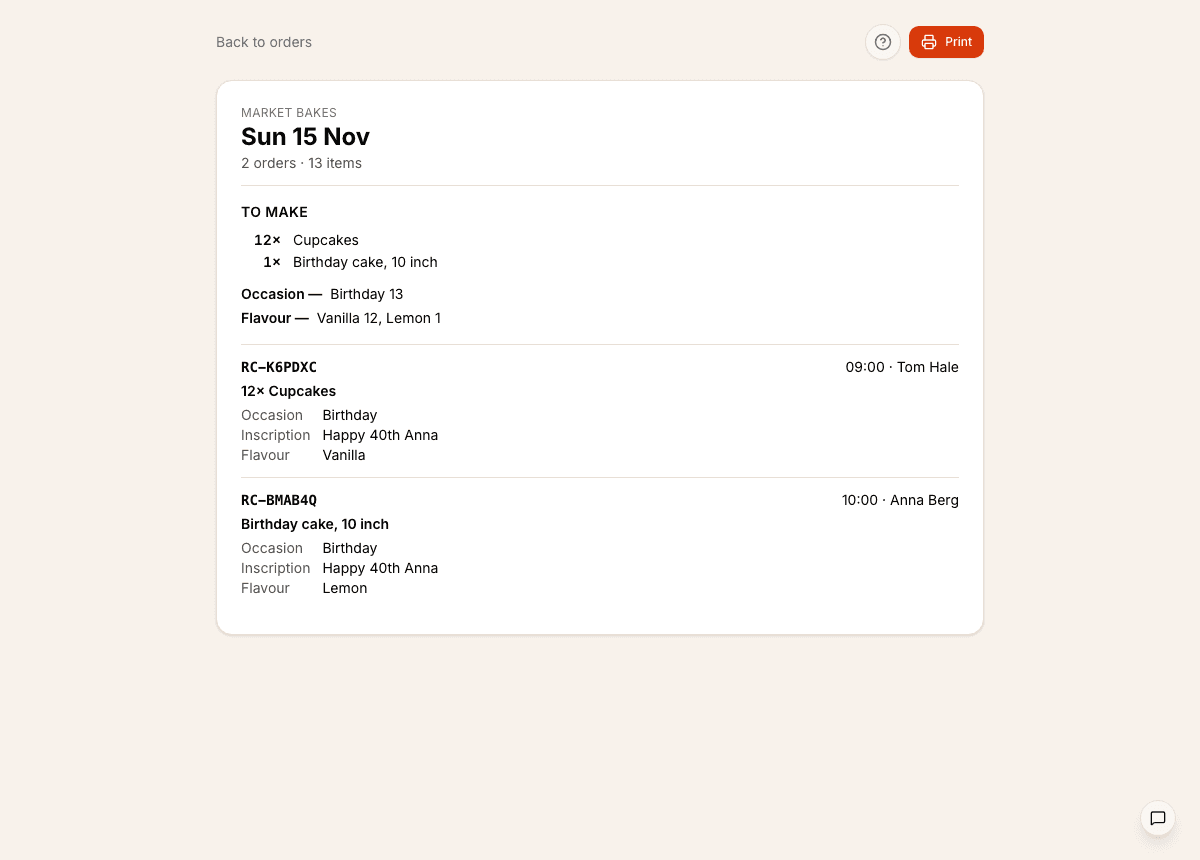
- To make: how many of each thing, counted in items. Twelve chocolate cupcakes in one order and four in another make "16× Cupcakes". Spellings are grouped, so "Cupcakes" and "cupcakes" count together.
- Under it, the totals for each choice and yes/no question: how many items got each answer, such as "Flavour — Chocolate 12, Vanilla 4".
- Then every order for the day, by time: reference, time, customer and phone, what they ordered, every answer and their special wishes.
Declined and archived orders aren't on it. An order counts on the date you agreed with the customer, or the one they picked if you didn't agree another.
Prices aren't on the sheet: it's for the bench, not the books.